Showing posts with label tech tips. Show all posts
Showing posts with label tech tips. Show all posts
Friday, August 20, 2010
A Smart Way To Further Refine Your Google Searches
Lifehacker posted this great little tip/Google update that can make you or your boss an even bigger searching superstar. If you have a second, it's worth checking out.

Monday, August 9, 2010
Apptastic List
 If you have an iPhone, you have to check out this great list from Lifehacker of all the best apps for it!
Tuesday, June 15, 2010
DIY Laptop Stands

If you like to sit in bed and use your laptop, but you have a hard time getting comfortable, check out this post from Lifehacker that shows you a bunch of really inventive DIY laptop stands.
Tuesday, May 11, 2010
Light As A USB
 I'm not sure why, but I find these quirky USB flash drives that look like either a comb or a feather from Uncommon Goods entertaining. If you need a funny, but useful gift for your favorite techie, check them out.
Friday, April 16, 2010
Printing From Your iPad
Geeksugar had a great post today about a way to print from your iPad. The site is worth checking out regularly, as they always seem to have interesting info and tips.
Monday, April 12, 2010
Tricks For Better Searching
 The New York Times recently ran this article about helpful tricks to use when utilizing Google that will help you to refine your search and/or make it quicker. You and/or your boss might know some of them, but it's worth taking a look to find out about a few new ideas that will save you time.
Monday, April 5, 2010
Reading Scripts On The iPad
 I'm resisting the urge to get an iPad right now (since I have a iPhone, Kindle and laptop it seems pointless), but I'm glad to know that if I do decide to get one at some point that there are ways to read scripts on it that are user-friendly and easy on the eyes. John August did a great post about a app he got for the iPad that allows him to read scripts, so if you or your boss might be getting one and want to read scripts on it, take a minute and check it out.
Friday, February 19, 2010
Proof That I Don't Only Care About the iPhone
 Believe it or not you will use a Kindle app on a smartphone more than you think you might. I had my iPhone Kindle app and read a book on my iPhone before I ever got my full size Kindle and I found it useful. When you're at a location like the car wash reading a few pages of a book on something that size doesn't really bother your eyes at all (at least not mine). Amazon now has a Kindle app for the Blackberry, so if you have one of those you might want to check it out.
Wednesday, January 13, 2010
A Big Keyboard For A Small Smartphone
 I can't explain why I want this keyboard for an iPhone that ION displayed at CES, but I kind of do and I can actually see a use for it. If you travel often and don't really need a laptop, but might end up needing to type a bunch of e-mails, it would being useful. I guess my decision about it will be based on the cost. When it's available for purchase, I will blog about it again.
Thursday, December 17, 2009
Free Apps For All
If you have an iPhone and you want to know what cool apps for it you can get for free, check out this post from Gizmodo that lists some of the best picks out there.
Wednesday, December 9, 2009
Gate Guru

I just read the other day about a great new iPhone app for those who travel often called Gate Guru . It's a great little addition to the iPhone for the frequent traveler that helps you to figure out what food, shops and amenities are available in the airport you or your boss is heading to at the moment. It's not free, but it isn't very expensive, so it's worth a look.
Sunday, December 6, 2009
Awash In Email
Are you buried in e-mail and unable to manage it all? I think in this digital age it's hard not to feel overwhelmed by all the ways people can contact you and e-mail especially can get out of hand pretty quick. The Bits Blog of the New York Times has a few ideas how you can arm yourself to better deal with e-mail and it mentions one of my favorite solutions, Merlin Mann's famous strategy, Inbox Zero, that was featured in a talk he gave at Google. Both the article and video are worth taking the time to check out because in the long run they will make you more efficient.
Thursday, December 3, 2009
Just Resize It!
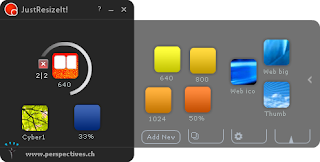
This Adobe Air App called Just Resize It looks like a very easy way to resize an image without going through a big hassle. I think I'm going to check it out and you might want to take a minute to do so as well. I would imagine it would be helpful at work and home.
Tuesday, November 10, 2009
Free Gift From Google For the Holidays
Google loves you and wants to give you a gift -- Free Wi-Fi at airports in many cities (including Las Vegas, San Jose, Boston, Baltimore, Burbank, Houston, Indianapolis, Seattle, Miami, Ft. Lauderdale, Orlando, St. Louis and Charlotte) from now until January 15th. If you end up at the airport bored or if your family is driving you nuts, feel free to get online and have some fun or catch up on some work.
Tuesday, November 3, 2009
A Quick & Useful Amazon Shortcut
When you're sitting at your desk ordering a book for yourself or a gift for your boss, time is often short, so check out this new shortcut from Amazon called Payphrase. This new feature allows you to create a phrase that is linked to a specific delivery address and billing info and then when you go to check out it can happen even quicker than normal. I love anything that makes things more efficient and I buy from Amazon, so I think I'm going to do this.
Tuesday, October 13, 2009
Never Send An Email To The Wrong Person Again
This new Gmail feature (you can turn on it on the labs section) that helps to make sure you never e-mail the wrong Bob, etc. in your contacts if you have a few, seems very cool and useful. If you have a minute, read all about it here.


Thursday, October 8, 2009
How To Charge Your Gadgets & Stay Warm At The Same Time
Okay, seriously - this jacket I just read about is genius. It's a must have item if your boss travels to the cold or if you do. The jacket provides continuous heat and allows you to charge your gadgets. If I ever get the chance to go to Sundance, I'm for sure buying this jacket to take with me. If it interests you check out the video review of it below.
Wednesday, October 7, 2009
Quick Little Mapquest Tip
I pride myself a bit on what a tech geek I can be, but I found out something yesterday that I didn't know. After you get directions on Mapquest and go to print them you will get a little text box at the top where you can add notes to your map/directions. I love that idea for adding the telephone number of where your boss might be going or just a note about the location to help them find it. I know it's a simple tip, but it is actually very useful. I don't think I should lose my tech cred for this one though because a big reason why I don't know this is that I use Google Maps.
Thursday, October 1, 2009
iGlasses
Here's a quick tip that might be helpful to iPhone owners. If you lose your glasses or your boss forgets to bring their glasses to work, you can suggest they buy an app called Eye Glasses that utilizes the camera in your iPhone to help read small text or more clearly display imagery. If you are interested read more about it here.
Tuesday, September 29, 2009
Flip Through The News On The Go
I pretty much never shut up on this blog about how important it is to stay on top of what's going on in the world no matter what job you have. You need to be able to join in the discussion, have ideas and opinions if you want to impress people and it's harder to do that if you are only reading one source or just reading gossip. Technology has made this so much easier. There are million ways to keep on top of everything in an efficient way. A few weeks ago I wrote about about a new beta google site I like called Fast Flip that allows you flip through tons of news articles on every topic and see what's most popular and current. You can now also utilize it on the go on your iPhone. All you have to do is create a shortcut from this url to your phone.

Subscribe to:
Posts (Atom)

 Posts
Posts


